
Putting a SOC’s experience at the analyst’s fingertips
An MSc project at ESH built an AI assistant that adds knowledge from past investigations and threat reports to the alert an analyst is working on. Eight of our analysts tested it on a realistic malware case.
In short
- During an investigation, analysts need knowledge from earlier cases and from threat reports. Finding it takes time, and much of it depends on who is on shift.
- The assistant looks up that knowledge and shows it next to the case evidence, together with concrete checks to do next.
- Eight ESH analysts used it on a realistic malware case. They found it most useful for checking their own reasoning and for suggesting checks they had not thought of.
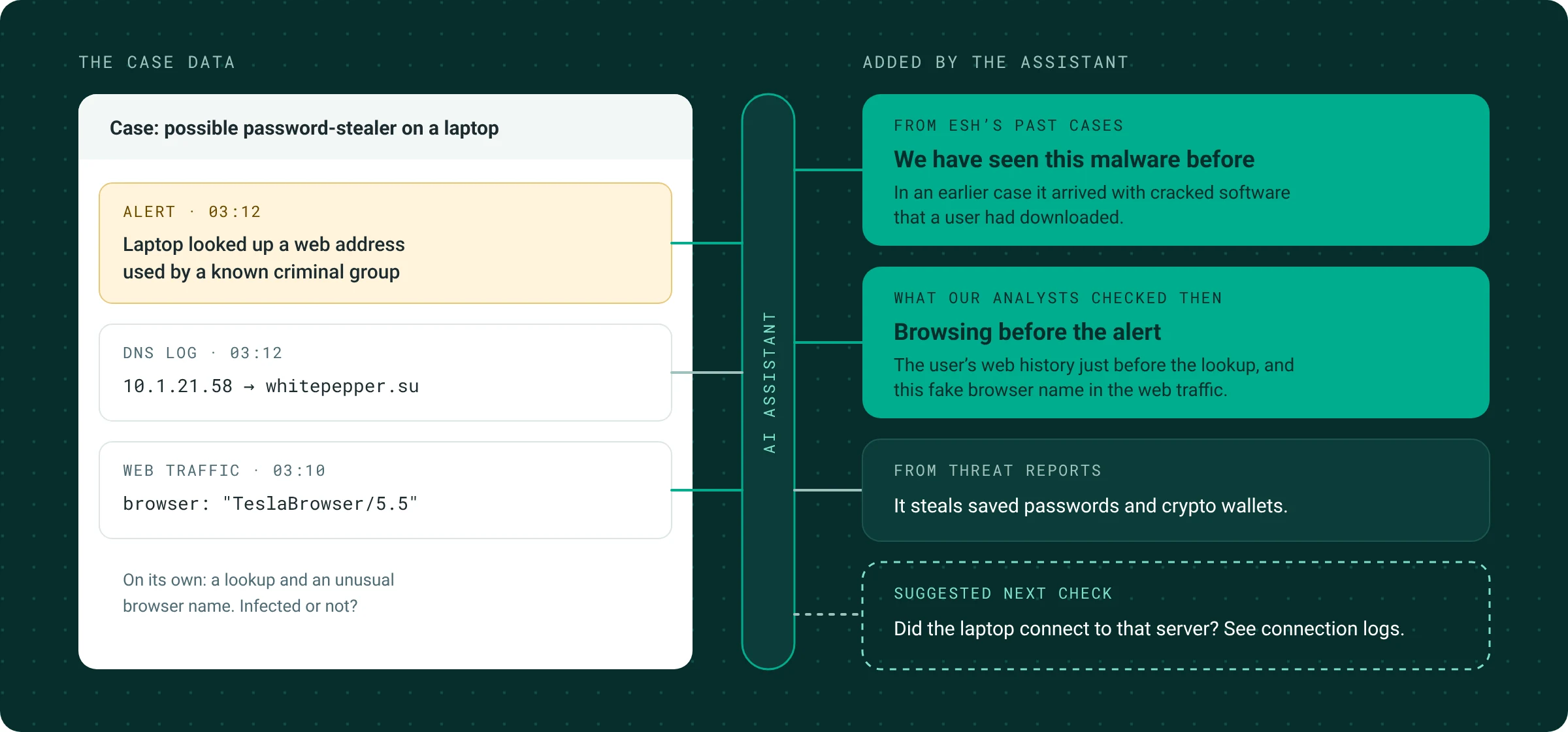
The idea. The analyst’s case data on the left; on the right, knowledge the assistant attaches to it from ESH’s past investigations and from threat reports, plus a concrete next check. Based on the test case used in the study.
Where SOC knowledge lives today
A security operations centre (SOC) monitors an organisation’s systems around the clock and investigates anything suspicious. For each alert, an analyst works out what is happening, how it could have started, and what to check next.
Much of what helps answer those questions comes from experience: earlier investigations, how a particular client’s network is set up, and which checks settled a similar case last time. Some of this is written down in case records; some exists only in the heads of experienced colleagues. Threat-intelligence reports add knowledge from outside, describing how specific criminal groups operate. In practice, how much of this an analyst can use depends on how long they have been on the team and who else is on shift.
Adding the team’s experience to the case
Zuhayr Mirza’s MSc project at TU/e, carried out at ESH, addresses this with an AI assistant built into the case system our analysts already use. The analyst selects the alert and logs they are working on, and can add a note with their own hypothesis.
The assistant then searches two collections: ESH’s records of past investigations, and a set of threat-intelligence reports. It also consults a knowledge graph, a structured map that links threats to the behaviour they show, the traces they leave and the checks that can confirm them. A language model combines what it finds with the case evidence.
The result is attached to the case: a short reading of the evidence, a comparison with similar past cases and what the team learned from them, and three concrete checks with the logs to look in. Each piece of background knowledge is shown with its source, so the analyst can open the original case or report.
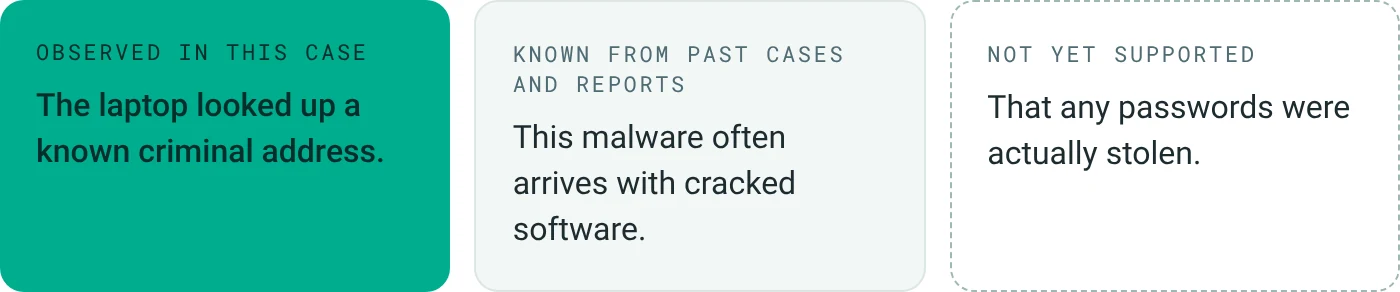
Figure 1. Each statement in the assistant’s answer is labelled by where it comes from.
The assistant keeps track of where each statement comes from. What was observed in the current case is kept separate from what is known from past cases or reports, and claims that the evidence does not yet support are listed on their own. A report saying a group usually steals data does not show that data was stolen in this case, and the analyst needs to see that difference at a glance.
Working backwards from the alert
To structure its suggestions, the assistant places the observed activity on a simple timeline of an attack (Figure 2). It then reasons backwards: if the laptop is contacting a criminal server, what must have happened earlier, and which evidence would show it?
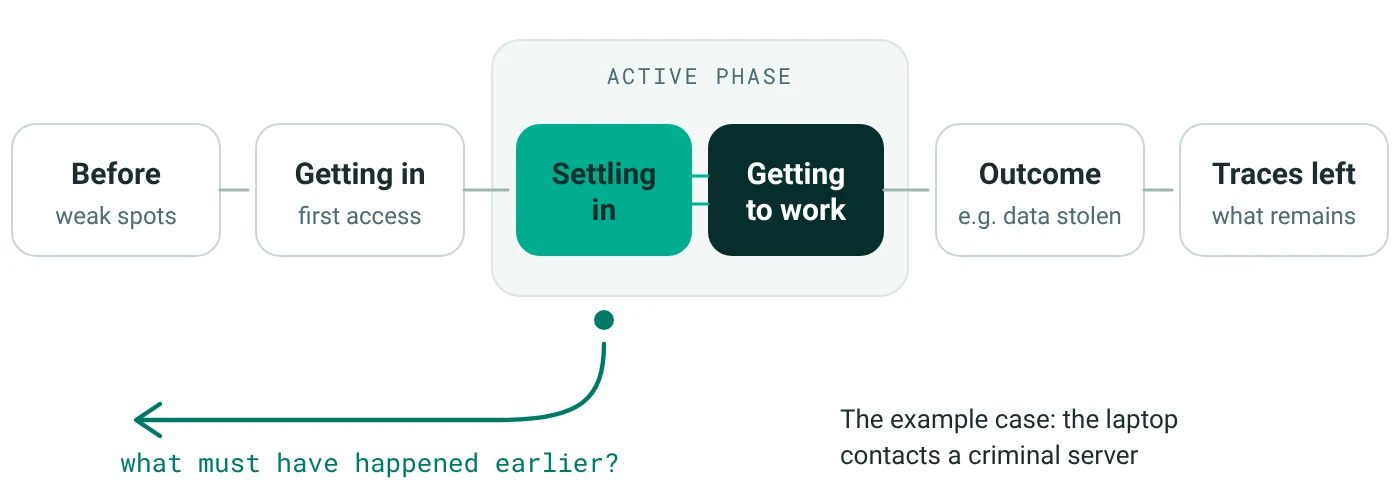
Figure 2. The attack timeline the assistant uses. Settling in and getting to work can repeat and overlap, as they do in real incidents.
This turns a single alert into a short list of checks. In the example, a plausible explanation is that a user downloaded infected software shortly before the alert. The suggested checks are what was downloaded, whether the laptop actually connected to the server, and which program made the request.
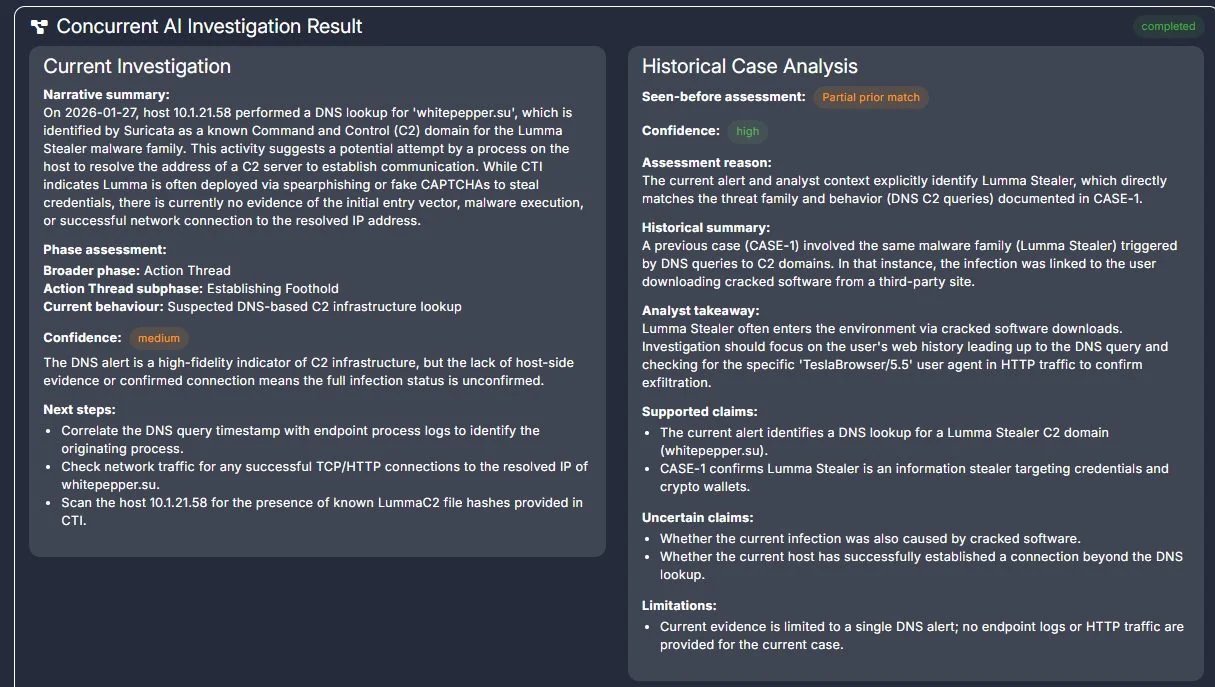
Figure 3. The assistant’s answer in the case system. Left: a reading of the current evidence, its place on the attack timeline, a confidence level and next steps. Right: a similar past case, what the team learned from it, and which claims are still uncertain.
Testing it with ESH analysts
Because ESH runs an operational SOC, we could test the assistant with working analysts. Eight of them, six tier 1 and two tier 2, investigated the same case, built from real network traffic of an infostealer called Lumma Stealer. They received an alert and a hypothesis, that a Windows laptop was infected, and were asked to test it critically. They thought aloud while working, wrote a short report and discussed the tool afterwards.
8
ESH analysts took part, each on the same case
24/24
answers made no claims beyond the case evidence
5 of 8
analysts reached the expected conclusion; three were more cautious
2.9 → 3.8
average confidence in the conclusion, start to finish (out of 5)
All 24 answers the assistant gave during the sessions placed the case at a plausible point on the attack timeline and made no claims that the evidence did not support. Average confidence in the final conclusion went up over the session. The study had no comparison group working without the assistant, so this increase cannot be attributed to the tool alone.
The analysts were most positive about the separation between case evidence and background knowledge, and about the suggested checks:
“A possible list of indicators, more than you might be able to come up with on the spot.” (Tier 1 analyst, ESH)
Most described using the assistant after their own first look at a case: investigate, ask the assistant to confirm or question the findings, then verify by hand. As one of them put it, “AI should not have the final say.”